We’ve all been there—staring at a to-do list that seems endless, avoiding the nagging feeling of unproductive days, or wondering where to start. If you’ve been spinning in loops of indecision, this guide will break you free.
The flowchart below is a deceptively simple yet powerful tool to eliminate procrastination, clarify priorities, and get things done, one decision at a time.
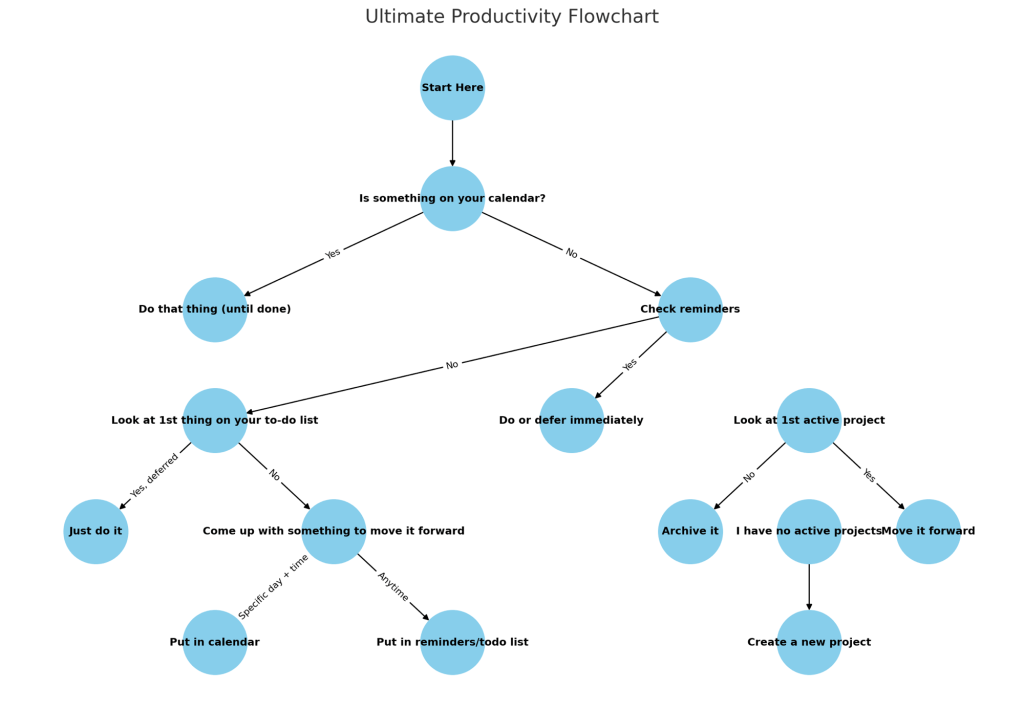
Trust me. You’ll want to print this out. Let’s walk through it step by step.
Step 1: Start Here
The flowchart starts with a single question:
“Is something on your calendar right now?”
• If yes → Do that thing until it’s done.
• If no → Keep moving through the system.
The brilliance here is that if you’ve already scheduled it, the choice is removed. No overthinking. Just execute.
Step 2: Check Your Reminders
If you’re calendar-free, it’s time to check your reminders.
• Something there? Do or defer it immediately.
• Nothing there? Let’s go to your to-do list.
Step 3: Look at Your To-Do List
This is where most people get stuck. You stare at the list, panic a little, and close the app. The chart cuts through this paralysis with precision:
1. Find the first item on your list.
2. Ask: “Have you deferred it already?”
• If yes, stop the loop—just do it (for crying out loud).
• If no, it’s time to come up with an action to move the task forward.
The key here is forward motion. No task is too small to take some action.
Step 4: Move Tasks Forward
Now you’ve identified a next step. The question becomes:
“When should I do it?”
You have two choices:
1. Specific Day + Time → Put it on your calendar.
2. Anytime → Put it in your reminders or back in your to-do list.
This removes ambiguity and ensures the task doesn’t float endlessly in “someday” limbo.
Step 5: Look at Active Projects
If your to-do list is empty, take a look at your 1st active project:
• Is it still relevant?
• If yes, great—move the project forward.
• If no, archive it and move on.
Projects that no longer serve you are clutter. Let them go.
If you have no active projects, congratulations! You’re starting fresh. It’s time to create a new project and get excited about what’s next.
Key Takeaways from This System
1. Decisions are Binary: This chart removes ambiguity. It breaks every moment of indecision into clear “yes” or “no” questions.
2. Action Over Perfection: The system focuses on moving tasks forward, not getting stuck on perfect timing or ideal conditions.
3. Eliminate Clutter: If tasks or projects aren’t relevant anymore, you archive them—freeing up mental and emotional space.
4. Build Systems, Not Just Lists: By integrating calendars, reminders, and to-do lists, this method turns your workflow into a seamless system.
How to Use It
1. Print out the flowchart and keep it visible—on your desk, fridge, or workspace.
2. When you feel stuck, overwhelmed, or uncertain about what to do next, start at the top.
3. Let the system guide you to clarity and action
Productivity doesn’t need to be complicated. This flowchart combines simplicity with laser focus, allowing you to cut through procrastination and overwhelm.
Trust the system. Trust yourself. Start anywhere—and take the next step.
Print this out. Trust me.
 Maverick